

Over 10,000+ Intervals Monitored
Meet the #1 Network Monitoring Platform
Real-time alerts, emails, web & mobile. Start monitoring your assets in 30 seconds.
Seamless Integration with Your Favorite Tools






Services & Monitors
Catch downtime before your users do.
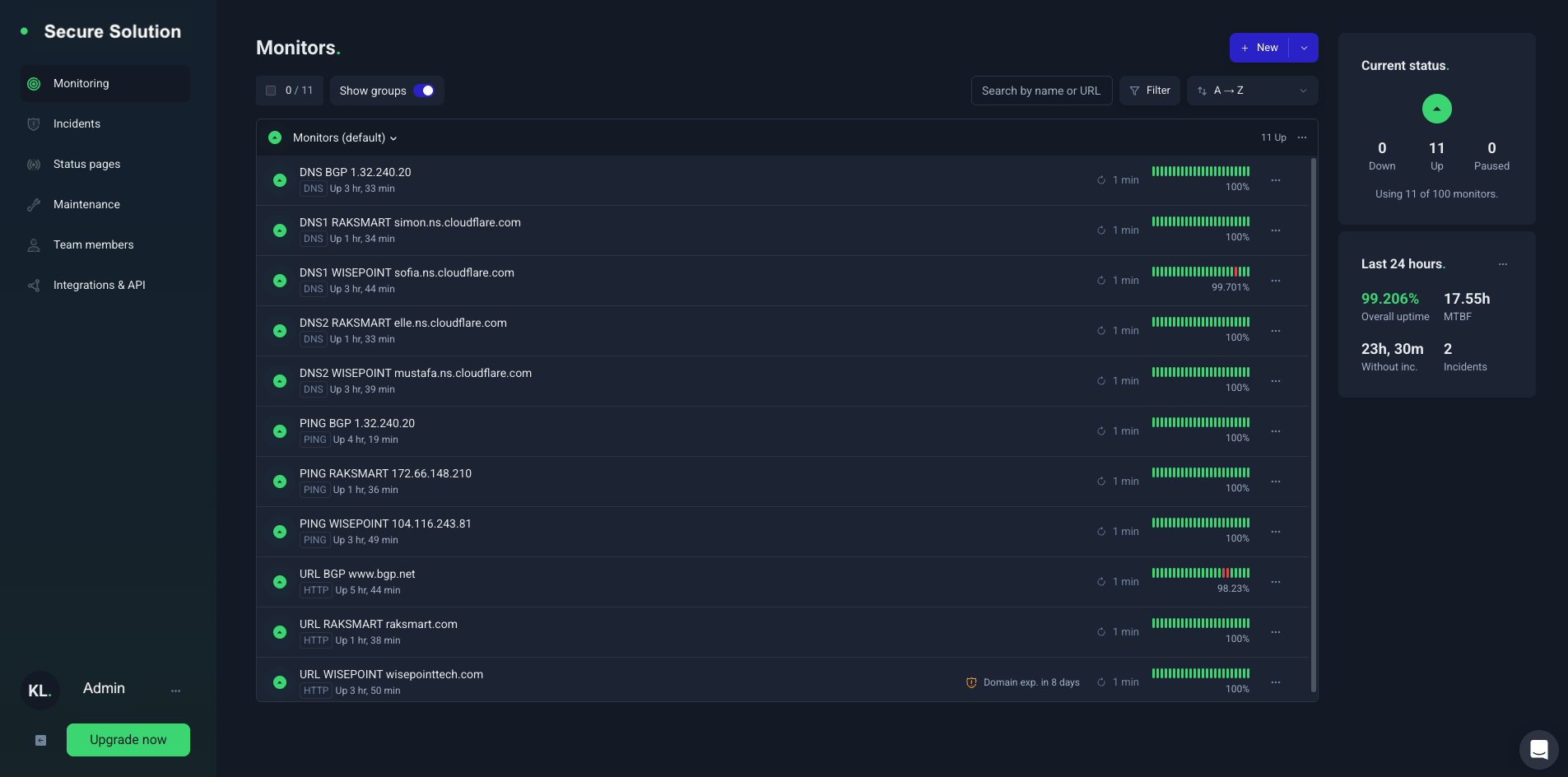
Monitor uptime, SSL certificates, ports, and cron jobs in real time. Set up monitors in minutes, get instant alerts when something breaks, and integrate with your existing workflow effortlessly.

Website Monitoring
Don’t be the last one to notice that your website is down. Try Secure Solution – the world’s leading website monitoring service.

Keyword Monitoring
Create simple keyword‑based monitors when you need to check for a specific keyword or a keyword phrase on a page.

Ping Monitoring
Ping any device or server. Make sure your server or any device in the network is always available with the ping monitoring.

Port Monitoring
Useful for SMTP, POP3, FTP, and other services running on specific TCP ports to ensure any service on your server is still available.

Cron Job Monitoring
This reliable and simple cron job monitoring (also known as heartbeat monitoring) will help you monitor all your important cron jobs.

DNS Record Monitoring
Protect your website with automated DNS monitoring and get instant alerts for DNS record changes and outages.
Features & Benefits
Deep insights. Full control. Zero blind spots.
Go beyond simple uptime checks with advanced monitoring, incident management and access built for scaling teams.

Integration & Incident
Keep your whole team in the loop.
From chat to incident management, we integrate with 20+ services so your team never misses a critical update.
Monitor & Control
Monitor on the go.
Get real-time alerts and manage all your monitors from anywhere. Check statuses, pause monitors, and resolve incidents instantly.

Testimonials & Reviews
Hear From Our Happy Clients: Their Stories
Monitored over 10,000 intervals.

Emily R.
Marketing Lead

We switched from a legacy tool, and I can’t believe the difference. Setup was a breeze, and every question I had was answered within minutes. That level of care is rare.

Mark T
Startup Founder
I love how everything just works. No steep learning curve, no messy configurations—just a clean, powerful product that delivers what it promises.

John Doe
Founder
Beyond the robust features, what really impressed me was the onboarding support. They walked me through everything step-by-step and made us feel valued.

Jason M
Product Manager
The features are great, but the support team truly sets this SaaS apart. From onboarding to daily use, their quick responses and helpful guidance made the whole experience smooth and stress-free. It feels like we have a real partner, not just a service.

Lena K
UX Consultant
This SaaS solution is a gem. It adapts perfectly to our needs, scales effortlessly, and the team behind it feels more like a partner than a provider.

Aliana Lorel
Founder – Lorel Technology
As someone who’s tried countless tools, this one stands out. Performance is solid, updates are regular, and customer service? Simply outstanding.

Sara D
Freelancer
This platform completely transformed how we manage our workflow. The intuitive UI, along with a support team that truly cares, makes it one of the best SaaS experiences I’ve had.

David V
IT Director
Smooth, fast, and reliable. Our team instantly became more productive. The personalized help during onboarding made a huge difference.

Peter Brandson
Owner – Brandson Industry
User-friendly, beautifully designed, and packed with functionality. I’ve never experienced such responsive support. Worth every penny.
Frequently Asked Questions
Got Questions? We’ve Got Answers.
Can’t find what you need? Contact us now.
What is Secure Solutions?
Secure Solutions is an network monitoring service that continuously checks websites, APIs, and other endpoints. It alerts you when anything goes down, degrades, or changes. So you can stay on top of your systems’ current states and identify issues before your users do.
What is an uptime monitor?
A uptime monitor is a single tool that repeatedly verifies a target webpage or service is online and working as expected.
When a uptime monitor detects a problem, it instantly sends alerts (via email, SMS/IM, call, etc.) so you can respond quickly. It also records incidents with timestamps and details in your dashboard so that you can track reliability over time.
How do I monitor the uptime of a website?
1. Sign up to create a Secure Solutions account
2. In the dashboard, click Add New Monitor
3. Choose HTTP(S) as the monitor type and enter the website URL
4. Set the monitoring interval and any optional settings you care about (timeouts, redirects, keyword checks)
5. Add your preferred notification channels (email, push, Slack, SMS, etc.) and save the monitor
What can I monitor with Secure Solutions?
With Secure Solutions, you can monitor any website, API, server, application, service, network, or endpoint, whether it’s yours, a third-party vendor’s, or a dependency you rely on. Additionally, UptimeRobots supports these monitor types:
- HTTP/HTTPS
- Keywords in server responses and on-page
- Ping
- Port
- Cron jobs/heartbeats
- Website change detection
- Response time
- DNS changes
- SSL certificates and domain expiry
The variety of monitor types lets you track availability, response behavior, certificates, scheduled jobs, and infrastructure changes from one place.
How often does Secure Solutions check my website?
Secure Solutions can check your site and other endpoints as often as every 30 seconds and as infrequently as every 5 minutes, depending on your monitor’s settings.
Faster intervals improve time-to-detect, but can create more noise if your endpoint is flaky or the network is unstable.
How do I get an alert when a website is down (by email, SMS/IM, or phone)?
Add one or more notification channels and associate them with your monitors. The available personal channels include Email, SMS, Voice Call, Mobile App Push, and Email-to-SMS.
How does Secure Solutions reduce false alarms (false positives)?
Secure Solutions reduces false alarms by rechecking failures across multiple checker nodes and locations before opening an incident. You can further improve signal-to-noise by white-listing Secure Solution locations and IP addresses, tuning sensitivity (timeouts and delays), and using more specific checks (such as validating a keyword or expected response behavior). For planned work, use maintenance windows to pause monitoring so expected downtime doesn’t trigger alerts or affect uptime calculation and downtime statistics.

Start monitoring your assets in 30 seconds.
There’s nothing to install. No credit card required.